QUANTUM APPS
Free, open-source Android apps that stay out of your way. Some put the sites you already use behind one front door and block the ads on the way; others are tools that work with no network at all.
Every app here was written by AI — Claude Code — including this page. The complete source for each one is public on GitHub. Read it before you install an APK, from me or from anyone. Nothing here collects analytics, telemetry or accounts.
THE APPS
Android 7.0 or newer, except Quantum Ink which needs 8.0. Installed by downloading the APK, not through the Play Store.

QUANTUM INK
WRITING- Opens where you left off. Last chapter, last cursor position, keyboard already up. No dashboard, no splash — zero taps between opening the app and writing the next word.
- Saves constantly, without a timer. Your text is written to local storage about half a second after you stop typing, on every app switch, and every 20 seconds during a sprint. Force-stopping the app mid-sentence loses nothing.
- A story bible that does not interrupt you. Select a name, tap once, and the entry appears in a sheet over the page. Entries answer to aliases, so "the Ashbound King" finds Kaelen. Your cursor never moves.
- Catches a name drifting. Find every use of a term across the manuscript, and every spelling one letter away from it — the thing that catches "Kaellen" on page two hundred.
- Writing sprints. 10 to 45 minutes, with live words per minute and an estimate of when the chapter finishes at your current pace. Every sprint ends with a restore point.
- Loose threads and quick jots. Track promises the story has not yet kept, and capture a stray thought in one line without leaving the canvas.
- A time machine. Restore points after every sprint and whenever you ask. Restoring is itself undoable, because the current text is saved first.
- Typewriter mode. Keeps the line you are writing in the middle of the screen, so your eyes never track down toward the keyboard.
- Export anywhere. Markdown or plain text, one chapter or the whole manuscript, through Android's file picker.
- Streaks only if you want them. Daily goal, streak and freezes all live in a drawer, never on the page. Every feature in the app can be switched off, and when it is off it is not drawn at all.
- Nothing leaves the device. There is no internet permission in the app at all — it cannot phone home because it cannot reach the network.
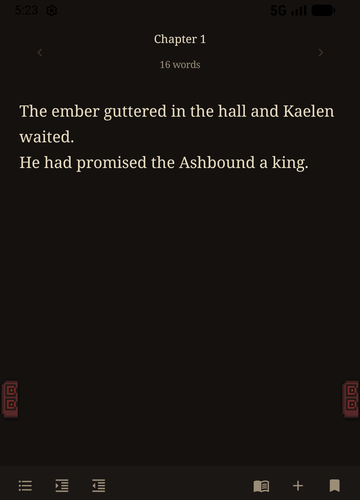
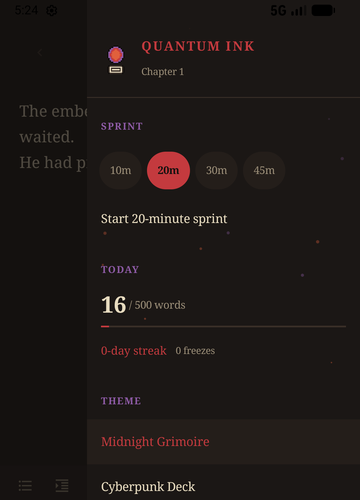
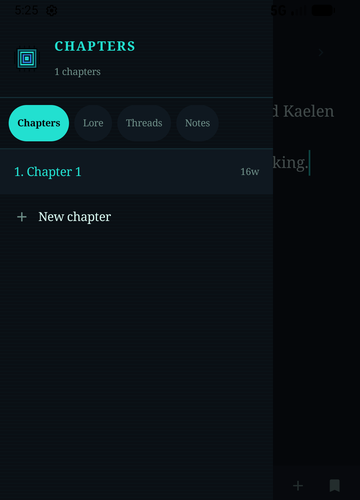
One honest note. The sprint lock asks Android to pin the screen rather than pretending to be a kiosk — no ordinary app can block task switching, and anything claiming otherwise is lying to you. It is friction that makes leaving deliberate. Your words are saved either way.
QUANTUM MTG
MAGIC: THE GATHERING- Three sites, one app. Moxfield for deckbuilding, TCGplayer for buying cards, XMage Nexus for playing online. Switch from a drawer on the right edge. Browsing needs no account.
- Blocks ads, popups and redirects. Three layers, the way real blockers work: a 370-domain blocklist matched against every request and its parent domains, URL pattern filters, and CSS element hiding. Popup windows never open.
- The sites still work. Blanket ad rules break single-page apps, so full-screen overlays are only removed when the element itself looks like an ad. Moxfield's deck editor, card previews and the TCGplayer cart survive.
- Card images load. Moxfield serves card art from Scryfall's CDN on a different domain to the site itself. That CDN is explicitly allowed through, so pictures are never blanked out.
- Desktop-site toggle. Moxfield's deck editor and XMage Nexus are laid out for wide screens. One tap swaps the user agent and reloads.
- Screen filters and text zoom. Eye comfort in two strengths, stay-awake blue, extra dark, sepia, grayscale, and text size controls.
- Sign-in works. OAuth popups would be swallowed by the popup blocker, so they are turned into ordinary top-level redirects.



Two limits worth knowing. Google blocks its sign-in flow inside every Android WebView, so use email or Discord on Moxfield. And XMage Nexus is the community and download site — the games themselves run in the separate XMage desktop client.

QUANTUMMANGA
MANGA, LIGHT NOVELS, FANFIC- Seven sites, one app. MangaFire and MangaDex for manga, NovelUpdates and Novelous for light novels, RoyalRoad and HoneyFeed for web novels, Archive of Our Own for fanfic.
- Blocks ads, popups and redirects. The same three-layer blocking, which on manga sites is most of the point: no popunders, no tab hijacks, no redirect chains between chapters.
- Image CDNs stay allowed. Manga pages are served from rotating CDN domains, which the blocker lets through, so pages are not left half-loaded.
- Reading filters and text zoom. Eye comfort in two strengths, sepia, extra dark, grayscale, stay-awake blue, and text size controls for novel sites.
- Links out still work. NovelUpdates sends you to translator sites by design, so outbound reading links are not intercepted.






INSTALLING
Same three steps for every app here.
- Tap DOWNLOAD APK. The file lands in your downloads folder.
- Open it. Android asks whether to allow installs from your browser — allow it. You only do this once.
- Tap Install, then open the app.
Android may warn that the app is from an unknown developer. That warning appears for everything installed outside the Play Store, including this. The source is public if you want to check what you are installing, or build it yourself instead.